Principal®
- 4.7
- Rating
- 1.00M
- Installs
- Free
- Price

 Analysis by App-foxy
Managing retirement, workplace benefits, or other long-term financial goals from a phone can be convenient, but finance apps deserve a more careful look than a typical social or entertainment download. I spent time examining Principal® as a mobile finance app, paying particular attention to how it fits into everyday money routines, what kind of control a user appears to have, and where convenience should not be confused with complete financial planning.
My overall impression is that this is most useful for people who already have a relationship with Principal Financial Group, Inc. and want a practical way to keep an eye on their financial goals while away from a computer. It is free to download, intended for Everyone, and has built a sizeable audience, with more than a million installs and a 4.7 average from roughly 42 thousand ratings. Those figures suggest that the app is familiar to many users, but they do not by themselves answer the more important question: whether it is the right financial tool for your particular situation.
Where Principal® earns trust—and where I still stay cautious
The developer behind the app is Principal Financial Group, Inc., a name directly associated with the service rather than an anonymous third-party budgeting tool. That context matters when an app is used to view or manage sensitive financial information. I would feel more comfortable starting with an official app connected to the provider of my account than entering those details into an unrelated aggregator simply because it has a polished interface.
You May Also Like

 Blood Strike: 2.5 Anniversary
Blood Strike’s Loadouts Turn Every Drop Into a Tactical Gamble
A close look at Blood Strike’s custom loadouts: how fast access to signature weapons reshapes its battle royale rhythm, rewards preparation, and narrows the gap between fights.

 Pandora - Music & Podcasts
Pandora’s Music Is Easy to Start, but Harder to Recover
Pandora’s strength is its low-effort path from a seed to a station. Its weak spot is how much confidence it asks you to place in connection, setup, and quiet recovery.

 8 Ball Pool
 Is Built on Rivalries, Rematches, and Routine
A close look at the rivalries, rematches, shared routines, and unanswered safety questions that turn a quick pool match into a persistent mobile community.

 Samsung Music
’s Quiet Strength Is Playing What You Already Own
Its reach comes less from spectacle than from dependable access to a personal library. That simplicity is both the app’s strongest retention engine and its ceiling.

 AccuWeather: Weather Radar
AccuWeather Review: A Quick, Clear Forecast for Everyday Decisions
For everyday plans, the best forecast is the one you can understand quickly. AccuWeather makes rain timing, radar, and local conditions easy to act on, with a few trade-offs.

 Hill Climb Racing
Why Hill Climb Racing Still Turns Crashes Into One More Run
A tiny car, a bumpy hill and one more upgrade: Hill Climb Racing keeps resurfacing because its simple chaos makes every near-miss feel personal.
More From Our News Desk



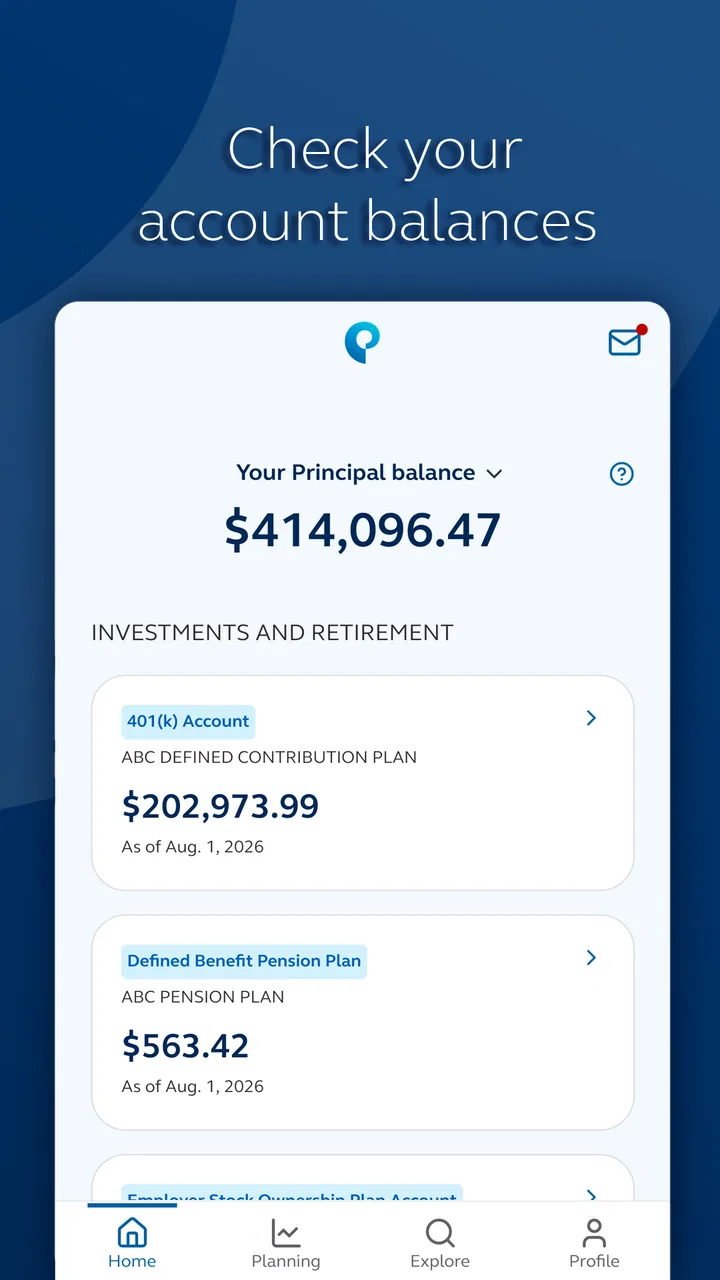
At the same time, the app should be judged as an account-access and financial-goal companion, not as an independent financial adviser. Its store summary focuses on keeping up with financial goals while on the go. That makes the intended role fairly clear: checking in, reviewing relevant information, and staying connected to Principal services from a mobile device. It does not make the app a replacement for understanding investment choices, retirement rules, tax consequences, or the details of an employer-sponsored plan.
That distinction is important in real life. A person may open the app after seeing a market headline, notice a change in an account value, and feel pressure to act immediately. I would use the app to observe and organize my next question, not to make a rushed decision based on a single screen. Mobile access is valuable, but financial context is often larger than what fits comfortably on a phone.
The app has been available since March 1, 2019, which gives it a more established presence than a brand-new finance product. Its listing shows around 2.3 thousand written reviews alongside the broader rating total. I see that as useful evidence of an active user base, but not as a guarantee that every account type or workflow will feel equally smooth. A workplace retirement participant, an individual investor, and someone checking insurance-related information may each have a different experience inside the same Principal ecosystem.
My first trust rule is simple: use Principal® as a direct window into your own relationship with Principal, not as a universal money dashboard. That mindset reduces the temptation to expect features designed for a completely different kind of finance app.
What I would check before relying on it
Before making it part of my routine, I would confirm that the app supports the specific Principal account or plan I use and that the sign-in path matches the official service I already recognize. This is not unnecessary caution. Finance apps handle information that can affect retirement planning, contributions, beneficiaries, and other consequential choices, so I prefer to verify the identity of the developer and the account connection before doing anything beyond browsing.
I would also decide in advance what I want the app to do for me. If the goal is simply checking progress, the app may be a good fit. If the goal is building a complete household budget across several banks, tracking every subscription, or comparing investments from multiple providers, a dedicated budgeting or portfolio tool may be more suitable. Principal’s strength is its connection to Principal services, not its ability to replace every other financial app.
Controls matter more than a polished login screen
When I review a finance app, I look for the choices available after signing in. Can I review information without immediately changing anything? Can I distinguish between a balance check and an actual transaction? Is it clear when a screen is informational and when it begins a consequential action? Those questions are more useful than judging the app by its icon or store description.
Principal® is best approached with a deliberate workflow. I would open it to review the current state of my goals, pause to read the labels around any action, and only then decide whether I need to continue. That habit is especially helpful on a small display, where a button, explanation, or warning may not have the same visual space it would receive on a desktop site.
For a person who checks an account during a commute or between appointments, the main benefit is reducing the friction of staying informed. A quick review can remind you to follow up on a contribution question or note that a document needs attention. But I would avoid treating a quick glance as a full review. If a decision involves changing an allocation, adjusting contributions, or interpreting a projection, I would slow down and use the larger account context available through the provider.
One practical tip is to separate “monitoring sessions” from “decision sessions.” During a monitoring session, I would only look at progress and recent information. During a decision session, I would gather the relevant plan details, consider the long-term effect, and read every confirmation carefully. This two-step approach is a better use of a mobile finance app than making an important change simply because the app makes access easy.
Account access is not the same as financial independence
A common misunderstanding with provider-specific apps is assuming that mobile access automatically gives complete control over every financial matter. In practice, what you can see or manage depends on the relationship attached to your login. An employer plan may work differently from an individually held product, and available actions may depend on the account itself.
That is why I would not recommend downloading Principal® solely because someone else says it is useful. I would first ask whether Principal administers something I already own or participate in. If the answer is no, the app may have little practical value for me. If the answer is yes, it can become a convenient companion for staying connected, but I would still keep official documents and broader planning resources nearby.
The app’s free price removes a common barrier to trying it, and the Everyone content rating makes it broadly accessible from an age-classification perspective. Neither point means that every financial decision inside the app is simple or appropriate for every user. A teenager, a new employee, and someone approaching retirement may all be allowed to access a finance app while needing very different explanations and levels of support.
Sensitive moments deserve a slower approach
The most sensitive moments are not necessarily the login itself. They are the moments when information turns into action: changing a contribution, reviewing a beneficiary, moving money, responding to a prompt, or interpreting a projected outcome. These actions can have effects that are difficult to reverse or understand immediately, so I would never complete them casually while distracted.
If I received a notification or opened the app because I was worried about a sudden change, I would first check whether I was looking at a current value, a historical figure, or a projection. A single number can mean different things depending on the screen and account type. I would also avoid making a retirement decision based only on a short-term movement. The app can help me notice something; it should not be the only source I use to interpret it.
Another useful habit is taking note of the exact wording before confirming an action. Financial interfaces sometimes use ordinary language for choices that have long-term implications. I would read the destination, timing, amount, and any follow-up message instead of tapping through quickly. If anything seems unclear, I would stop and seek clarification through Principal’s appropriate support channel rather than guessing.
For privacy-conscious users, the right question is not simply whether an app is from a recognizable company. I would review the permissions requested during installation and use, consider whether each one makes sense for the task, and revisit device-level access if my needs change. I would also use the strongest sign-in and device-lock options available to me. These are user-controlled steps that reduce avoidable exposure without requiring assumptions about the developer’s internal practices.
I would be particularly careful on shared or borrowed devices. A finance app should not become a shortcut for someone else to view account information. Logging out when appropriate, keeping the phone protected, and avoiding sensitive account activity on unsecured public devices are sensible habits regardless of how trustworthy the provider is.
How much choice does the user really have?
User agency begins with knowing when to pause. Principal® can make access more convenient, but convenience can also encourage frequent checking or impulsive reactions. I prefer to set a personal schedule—for example, reviewing goals at a calm time rather than repeatedly refreshing an account during a volatile day. The app should support my plan, not dictate my mood.
It also helps to keep a separate record of the questions I want answered. If I notice an unfamiliar term, a contribution issue, or a mismatch between what I expected and what I see, I would write it down before contacting support. This creates a clearer conversation and prevents me from making a change just to resolve uncertainty quickly.
One non-obvious trade-off is that a provider-specific app can be more relevant than a general finance tracker while being less useful for seeing the whole household picture. Principal® may be the better choice when my priority is staying close to Principal-held information. A general budgeting app may be better when my priority is combining checking, credit cards, loans, and accounts from several institutions. Using both can make sense, but I would avoid giving any third-party tool more access than necessary simply to reduce manual entry.
Another trade-off concerns screen size. A phone is excellent for a quick status check, but a desktop browser or a conversation with a qualified professional is often better for comparing scenarios and reading detailed documents. I would use the mobile app for timely awareness and save complex planning for a setting where I can concentrate. That is not a criticism unique to this product; it is a realistic limit of mobile financial decision-making.
Everyday scenario: a useful check without an impulsive change
Imagine that I am an employee who wants to keep my retirement goals visible during a busy week. I open the app on a lunch break, review the information connected to my Principal relationship, and notice that I need to clarify a contribution detail. Instead of changing anything immediately, I record the question, close the session, and return later with the relevant plan information in front of me.
That workflow shows where the app can be genuinely helpful. It keeps the account within reach and reduces the chance that I forget an issue until the next time I sit at a computer. It also shows why mobile convenience should be paired with restraint. The best result is not necessarily completing an action in the fewest taps; it is making a decision I understand.
For someone who travels frequently, this quick-access role may be especially valuable. For someone who rarely checks financial accounts and wants a complete planning system, the app may feel too narrow. I would not call that a flaw so much as a question of fit. A focused provider app and a full financial-planning platform solve different problems.
Who should choose it, and who should look elsewhere?
I would recommend Principal® to users who already hold an eligible relationship with Principal Financial Group, Inc., want mobile access, and are comfortable treating the app as one part of a larger financial routine. It is also a sensible option for people who prefer checking information directly with the provider instead of routing everything through an independent aggregator.
I would be more hesitant to recommend it to someone who expects a complete spending tracker, a cross-bank net-worth view, or hands-on guidance across unrelated financial products. I would also advise caution for anyone who tends to make emotional decisions after seeing account fluctuations. In that case, the app’s availability could encourage more checking without improving the quality of the decisions.
People who need detailed retirement education, tax guidance, or personalized investment advice should not assume that a mobile account app can provide all of that. The better choice may be a combination of the app for access and a qualified source for advice. Similarly, users who are uncomfortable reviewing permissions, securing their device, or managing account credentials may prefer a slower setup with support available.
My final view after weighing convenience against control
Principal® makes the most sense as a focused finance companion for an existing Principal customer. Its free availability, broad Everyone rating, established release history, and strong 4.7 average make it easy to consider, while its large install base shows that it is not an obscure experiment. Still, those visible signals should complement—not replace—my own checks around account relevance, device security, privacy choices, and the seriousness of any action I take inside it.
I like the idea of having financial goals available when I need a quick review, especially when the alternative is postponing an important question indefinitely. My caution is that mobile access can make complicated choices feel deceptively simple. I would use the app to stay informed, organize follow-ups, and maintain contact with my Principal relationship. I would not use it as my sole budgeting system, my only source of investment interpretation, or a reason to act quickly.
My cautious verdict: this is a worthwhile download for the right Principal customer, particularly someone who values direct account access and can separate checking from decision-making. It is less compelling for users seeking an all-in-one financial hub. If you install it, begin with a clear purpose, review the available account controls carefully, protect your device, and treat every consequential confirmation as a moment to slow down. That approach lets the app’s convenience work for you without surrendering your judgment.
FAQs for Principal®
01What is Principal® and what does it offer?
Principal® is a financial management app designed to help users plan and manage their finances effectively. It offers tools for budgeting, investment tracking, and retirement planning. Users can access personalized financial advice and insights, making it easier to achieve their financial goals. The app also provides secure access to account information and transaction history.
02Is Principal® secure for managing my financial information?
Yes, Principal® prioritizes security for its users. The app employs advanced encryption technologies and multi-factor authentication to protect sensitive data. Regular security audits are conducted to ensure the app remains compliant with industry standards, providing users with peace of mind when managing their financial information.
03Can I link multiple accounts to Principal®?
Absolutely. Principal® allows users to link multiple financial accounts, including bank accounts, credit cards, and investment portfolios. This feature enables a comprehensive view of your financial health, making it easier to track spending, manage budgets, and monitor investment performance all in one place.
04Does Principal® offer customer support if I encounter issues?
Yes, Principal® provides robust customer support to assist users with any issues or questions. Support is available through various channels, including in-app chat, email, and phone support. The app also has a detailed FAQ section and user guides to help users navigate common issues independently.
05Is Principal® available on both Android and iOS platforms?
Yes, Principal® is available for download on both Android and iOS platforms. Users can find the app on the Google Play Store and Apple App Store. It is designed to be user-friendly across devices, allowing seamless access to financial tools and insights whether you're using a smartphone or tablet.
Pros
- Intuitive user interface for easy navigation.
- Comprehensive financial planning tools.
- Real-time updates on investments.
- Secure login with biometric authentication.
- Customizable alerts for financial goals.
Cons
- Limited customer service hours.
- Occasional sync issues with bank accounts.
- Premium features behind a paywall.
- No support for international accounts.
- Limited third-party app integrations.

Principal®
Gallery